How to build a serverless web application that scales
You have a web app idea. Great. Now comes the part that usually slows everything down: figuring out where it lives, how the backend works, what happens when real users show up, and whether it will still work once they do.
That is why cloud-based web application development matters so much. The choices you make early affect how your app performs, scales, stores data, and stays online as you grow.
This guide breaks down how to build and launch a scalable cloud web app from scratch, without burying you in technical jargon. You will see what actually matters, what needs to be set up, and how to avoid creating a mess you have to rebuild later.
Of course, knowing what needs to happen and building it are two very different things.
With Anything's AI app builder, you can describe what you want to build in plain English and let Anything handle the technical setup behind it. That includes the database, authentication, hosting, backend, and the other pieces that normally turn a good idea into weeks of setup work.
You stay focused on the app and the business behind it. Anything handles the infrastructure and helps you get to something real, working, and ready for users much faster.
Table of contents
- What should you build with a serverless architecture?
- How do you design a serverless web application?
- How do you build and deploy a serverless web application?
- When should you build a serverless web application?
- Build your serverless web app without managing infrastructure
Summary
- Serverless architecture shifts complexity rather than eliminating it. Instead of managing infrastructure provisioning, builders face a new set of architectural decisions: where each layer lives, how components scale, and how the pieces connect. That trade-off is worth understanding before committing to the model.
- The cost case for serverless is real but conditional. Organizations can reduce infrastructure costs by up to 70% using serverless architecture, according to Redpanda, and AWS Lambda's free tier covers 1 million requests per month with 400,000 GB-seconds of compute time. But those numbers apply to specific workload shapes. Sustained high utilization, long-running processes, or misconfigured triggers can quickly reverse the economics.
- Serverless functions scale from zero to thousands of instances in under one second, which sounds like a straightforward advantage. The catch is that cold starts on infrequently invoked functions introduce latency that users will notice. Fast scaling and predictable scaling are two different things, and the architecture has to account for both.
- You can't retrofit security into a serverless application after the core is built. The OWASP API Security Top 10 consistently lists broken object-level authorization and improper asset management among the most exploited web application vulnerabilities. Design least-privilege IAM roles, encrypted secrets stored outside the codebase, and input validation at the API boundary from the start.
- Most production serverless deployments are not purely serverless. According to the Datadog State of Serverless 2023, over 70% of organizations using serverless also use containers, running a hybrid model where each compute type handles the workload it suits best. Serverless handles event-driven triggers and traffic spikes, while containers take on workloads that need consistent performance or longer execution windows.
- Observability across loosely coupled serverless components requires deliberate design, not a post-launch addition. Without structured logs that carry request IDs across the full call chain, function-level metrics, and cold-start tracking, debugging a failure spread across five components becomes genuinely difficult. The causal chain from bursty traffic to cold starts to latency degradation is only visible if you build monitoring in from the first deployment.
- Anything's AI app builder closes the gap between knowing the right serverless architecture and assembling it by generating production-ready applications with authentication, databases, and API connections already wired together from a plain-language description.
What should you build with a serverless architecture?
Serverless means the servers disappear from your to-do list; the cloud provider handles computing power, scaling, and patching. Your application still needs every layer a traditional app requires: a frontend, an API layer, data storage, authentication, file handling, async processing, and observability. The architecture changes. The requirements don't.
"Serverless doesn't eliminate complexity; it relocates it. Every layer your app needs still exists; you just don't manage the machines running it." Cloud Architecture Principle
💡 Tip: Before going serverless, map every layer your app requires: frontend, API, storage, auth, and more. Serverless changes how you manage them, not whether you need them.
Serverless changes how infrastructure is managed, but it does not eliminate the core components an application needs to function:
- Frontend – Yes – You still need a user-facing interface for web or mobile users.
- API layer – Yes – APIs remain necessary for communication between the frontend and backend services.
- Data storage – Yes – Applications still need databases or other storage systems to persist data.
- Authentication – Yes – User identity, access control, and permissions still need to be handled.
- File handling – Yes – Applications may still need to upload, store, process, and retrieve files.
- Async processing – Yes – Background jobs and event-driven workflows remain important for many applications.
- Observability – Yes – Logging, monitoring, and error tracking are still essential for maintaining production reliability.

Serverless shifts complexity from infrastructure provisioning to architectural decision-making. You still choose where each layer lives, how it scales, and how the pieces connect. That's a different kind of thinking, not an easier one.
⚠️ Warning: Don't assume serverless means less complexity; it means different complexity. Teams that skip architectural planning often face harder debugging and unexpected scaling costs later.
🎯 Key Point: The real shift in serverless isn't about removing work; it's about moving your focus from server management to system design. That demands sharper decision-making.
What your serverless application actually needs
A serverless app still needs a real structure. The frontend needs static hosting through a CDN like AWS CloudFront or Cloudflare Pages, so pages load fast without you managing servers.
Your compute runs through serverless functions. Those functions fire when someone makes an HTTP request, uploads a file, signs in, buys something, or triggers another app event.
Then you need the parts that make it usable:
- An API gateway to route requests cleanly
- A managed database that matches how your app reads and writes data
- Object storage for files and uploads
- Authentication so users can log in
- Queues for slow or background work
- Logs and alerts so you know when something breaks
For relational data, Amazon Aurora Serverless can make sense. For document-style data, Firestore is often a better fit. The point is not to pick the fanciest service. The point is to choose the one your app can actually run on without turning into a setup project.
Why do cold starts and scaling patterns catch new builders off guard?
Most new builders start with one or two functions. That part feels simple.
Then the real app shows up.
You need authentication, CORS, environment variables, a database connection, working logs, and a way to see what failed when something breaks. None of that feels exciting, but it decides whether your app works in production.
According to the Redpanda Blog, serverless functions can scale from zero to thousands of instances in under one second. That sounds great until an unused function has to wake up first. That delay is called a cold start, and users can feel it.
Fast scaling is useful. Predictable scaling is better.
What breaks when you figure out architecture as you go?
The usual mistake is to start coding functions and assume the rest can be patched in later.
That works until you add login. Or payments. Or user data. Or a database trigger that quietly fires too many times and runs up cost.
This is where builders get stuck. The app is not broken in one obvious place. It is broken because all the pieces were added separately, without a clear plan for how they should work together.
Anything takes a different approach. You describe what the app needs, and the structure forms around that intent. Function boundaries, storage, API routes, and app logic are wired together instead of left for you to chase down later.
That matters because setting up infrastructure should not be harder than building the app itself.
When does serverless actually deliver on its cost promises?
Serverless can save money when the app is designed well. The Redpanda Blog notes that organizations can reduce infrastructure costs by up to 70% using serverless architecture.
But serverless is not magic.
If functions call each other over and over, costs climb. If traffic patterns are hard to predict, billing gets harder to forecast. If your database connection setup is wrong, a cheap app can turn expensive fast.
Serverless rewards good architecture. It works best when each piece has a clear job, talks to the right service, and avoids unnecessary work.
Once you know what belongs in a serverless architecture, the harder question is how those pieces should communicate.
Related reading
- How Much Does It Cost To Build A Web Application
- How To Create Saas Application
- Rapid Application Development Tools
- Web Application Scalability
- Web Application Architecture
- Cloud-Based Web Application Development
- Best Website App Builder
- Build A Serverless Web Application
How do you design a serverless web application?
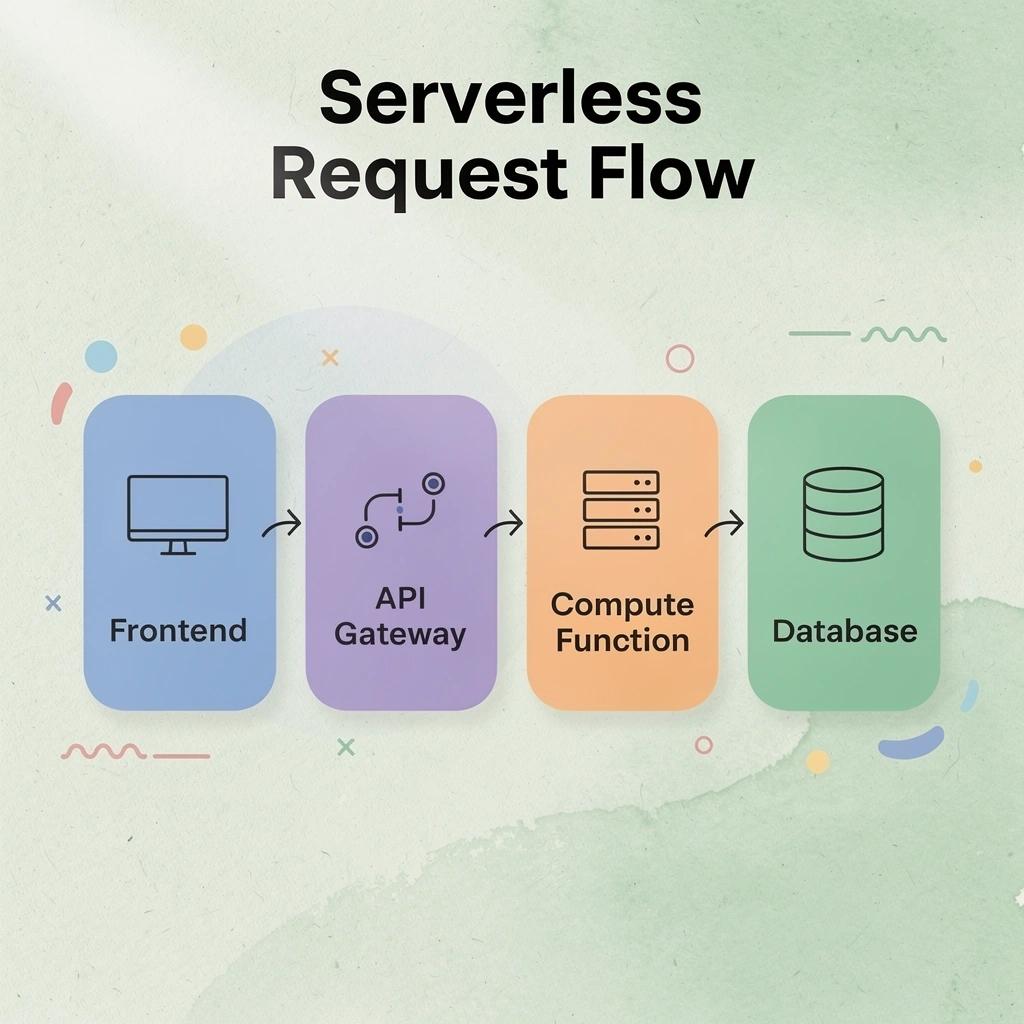
Start by mapping out the core workflow: user request → frontend → API gateway → compute function → database/external service → response. Every architectural decision you make should protect or improve this chain.
"Every choice you make about how to build the system should protect or improve this chain." Core Serverless Design Principle
A typical serverless request flows through several layers, with each component handling a specific part of the process:
- User request – The entry point from the client, such as a web or mobile app request.
- Frontend – Delivers the user interface and triggers API calls.
- API gateway – Routes and secures incoming traffic, connecting the frontend to backend services.
- Compute function – Executes the application's business logic when invoked.
- Database / external service – Stores or retrieves data required to complete the request.
- Response – Returns the processed result to the user, completing the request cycle.
💡 Tip: Sketch this end-to-end chain before writing a single line of code; identifying bottlenecks early saves significant rework later.
⚠️ Warning: Skipping a clearly defined API gateway layer is one of the most common mistakes in serverless design; it leaves your compute functions exposed and your traffic unmanaged.
What does your workload actually look like?
Start with the real job your app needs to do.
How many people will use it? How often will they click, upload, pay, message, or refresh? Will traffic come in steady waves, or will it spike when you launch, send an email, or post on social?
A content app with thousands of readers has a very different shape from a live collaboration tool where hundreds of people are writing at the same time. One mostly serves pages. The other has to handle constant changes without falling over.
That means you need to look at the basics before you write config:
- User volume
- Request frequency
- Traffic spikes
- Login and permission needs
- File upload size
- Background jobs
- Third-party API delays
This is the part a lot of builders skip because it feels technical. But it is really just asking, “What needs to keep working when real people show up?”
How does request pattern determine whether functions or containers fit?
Functions are great for small, clear jobs.
A user submits a form. A payment webhook fires. An image gets resized. A welcome email gets sent. The job starts, finishes, and shuts down.
That model works well when the task is short and predictable. You get lower costs, less setup, and fewer moving parts.
Containers make more sense when your app needs to stay alive for longer. Think live chat, background processing, heavier startup logic, persistent connections, or anything that needs more control over runtime behavior.
In plain english use functions for quick jobs. Use containers when the job needs more room to breathe.
The wrong choice usually shows up later. A function that should have been a container starts timing out. A container that should have been a function costs more than it needs to. The architecture did not fail because the idea was bad. It failed because the workload shape was guessed instead of understood.
How should your data layer be structured?
Your data layer is where your app stores the information people actually care about.
Users. Payments. Bookings. Messages. Files. Orders. Permissions. Activity history.
This is also where a lot of serverless apps get messy fast.
Relational databases are best when records need to stay connected and accurate. If you are handling payments, inventory, accounts, bookings, or financial records, you usually want transactions, joins, and strong consistency. Partial writes can create real problems.
NoSQL stores can work well when your app reads far more than it writes, the data shape changes often, or the structure is simple enough to scale horizontally.
A good shortcut:
- If the data is connected and needs to stay correct, use a relational model.
- If the data is flexible, high-read, and less interdependent, a document store may fit.
- If functions connect directly to a relational database, use connection pooling instead of opening raw database connections from every function.
That last point matters. Serverless apps can create a lot of short-lived connections very quickly. Without pooling, your database can become the bottleneck before your app even gets real traction.
How should security be built into your architecture from the start?
Security should be part of the first version, not something you bolt on after the app works.
That does not mean overcomplicating the build. It means making the basic decisions early:
- Who can log in?
- What can each user see?
- What can each user change?
- Where are secrets stored?
- What input is allowed through the API?
- What happens when something fails?
Most teams get into trouble when they build the happy path first and add permissions later. That creates gaps. A user can access the wrong record. A test endpoint stays public. A secret ends up in the codebase. A function gets more access than it needs.
The OWASP API Security Top 10 calls out broken object-level authorization and improper asset management because these are common ways APIs get exploited.
So keep it simple and strict from the start. Give every function the least access it needs. Store secrets outside your codebase. Validate input before it reaches your logic. Treat permissions as part of the product, not an extra layer.
Users do not care how elegant your architecture is if someone can see data they should not see.
How do AI app builders help non-technical founders make better architecture decisions?
Most non-technical founders can describe the app clearly.
They know the user flow. They know what customers need. They know where the money should come from. The hard part is turning that into databases, functions, auth, storage, hosting, and deployment choices.
That is where things usually slow down.
A founder asks for a marketplace, booking app, internal portal, or AI tool. Then they get pulled into decisions they were never trying to become experts in: serverless functions, containers, database structure, API design, permissions, deployment, logs, and scaling.
Platforms like AI app builder reduce that translation gap. You describe what you want in plain English, and the system turns that intent into working app structure. It can generate the architecture, build the function logic, connect components, and help the app move toward production instead of stopping at a pretty demo.
That matters because the goal is not to become an infrastructure expert. The goal is to ship an app that works, charges money, and keeps working after people start using it.
Why observability cannot be an afterthought
According to IBM Cloud Docs, deploying a serverless web application that manages metadata for GitHub repositories requires one IBM Cloud Code Engine project.
That sounds clean on paper. Real apps are usually messier.
A user clicks a button. The request hits an API. A function runs. A database call happens. A third-party service delays the response. Another function retries in the background. Then something breaks.
Without observability, you are guessing.
You need structured logs, request IDs, traces, and function-level metrics from the first deployment. Not because it sounds mature. Because you will need them the first time a user says, “It is not working,” and all you have is a vague error message.
Track the basics early:
- Request IDs across the full call chain
- Function duration
- Cold start frequency
- Error rates
- Failed third-party calls
- Retry behavior
- User-facing latency
Bursty traffic makes this even more important. A launch spike can trigger cold starts, cold starts can add latency, and latency can make the app feel broken. Without visibility into that chain, you only find the problem after users complain.
Knowing the architecture is useful. Seeing how it behaves in production is what keeps the app alive.
Related reading
- Windsurf Vs Cursor
- Windsurf Alternatives
- Cursor Vs. Copilot
- GitHub Copilot Alternatives
- Web Application Development Frameworks
- Lovable Vs Cursor
- Best PWA App Builder
- Lovable Vs Base44
- Best Tech Stack For Web App
How do you build and deploy a serverless web application?
Building and deploying a serverless web application requires following a specific sequence. Skip a step or reverse the order, and you'll end up fixing authentication failures in production or discovering your database has no connection-pooling strategy after your first traffic spike.
⚠️ Warning: Skipping or reordering steps causes production failures in serverless deployments. Always follow the sequence.
"The steps most builders skip are almost always the ones that cause production failures." Core Principle of Serverless Architecture
💡 Tip: Before writing code, map out your full deployment sequence, including authentication, database strategy, and traffic handling, so nothing catches you off guard at launch.

The path from idea to deployed serverless web app runs through nine distinct phases, and the ones most builders skip are almost always the ones that cause production failures.
🎯 Key Point: Every phase in the nine-step sequence exists for a reason; treat each one as non-negotiable, not optional.
Production reliability depends on addressing critical infrastructure and validation work before launch, rather than treating it as something to fix later:
- Authentication setup – Skipping authentication early can lead to auth failures at launch, making this a critical production requirement.
- Database strategy – Failing to plan for connection pooling can cause database overload or crashes when traffic spikes.
- Deployment configuration – Rushed or frequently reversed deployment changes can create broken or inconsistent environments.
- Testing & validation – Skipping testing to save time can allow silent failures into production, where they become harder to detect and fix.1. Define the one thing your app must do
Start with the one action your app has to get right.
For a task app, that means creating and finding a task. For a paid content platform, it means taking payment and unlocking access. For a booking app, it means letting someone choose a time and confirm it.
Everything else can wait.
Most apps get messy because builders try to create the full product too early. Build the core path first. Make sure it works from start to finish. Then add the nice-to-have parts around it.
2. Build the frontend and connect it to your API
Your frontend is what users see, so keep it fast and simple.
You can build it as a static site or single-page app and host it on a CDN-backed service like AWS S3 with CloudFront, Vercel, or Netlify. That keeps the user-facing part quick to load and cheaper to run because compute only happens when your API functions are called.
Then connect the frontend to your API Gateway endpoint. Use environment variables for the API base URL so you can switch between staging and production without digging through code.
That sounds small, but it matters. Hardcoded endpoints are the kind of thing that works during a demo and breaks when you try to ship.
3. Define your serverless functions around actions, not pages
This is where a lot of builders make the wrong turn.
They create functions that match pages instead of actions. That usually makes the backend harder to change later.
A better setup is to give each function one clear job. For example:
- createUser
- processPayment
- fetchDashboardData
- sendWelcomeEmail
Each function should do one thing, with the least access it needs to do that job. Give it its own IAM role, store secrets in environment variables or a secrets manager, and set a timeout that matches what the function actually does.
According to the Datadog State of Serverless 2023 report, 70% of AWS Lambda users choose Python, Node.js, or Java as their runtime. That makes sense. These languages have strong communities, good tooling, and enough real-world usage that you are not building on something obscure.
The goal is not to make the architecture look impressive. The goal is to make each part easy to understand, test, and fix.
4. Connect your database and lock down credentials
Before you write queries, decide how your app will read and store data.
If users will search tasks by status, design for that. If your app needs to fetch user records by ID, plan for that at the schema level. Waiting until production to add the right indexes is how simple apps become slow apps.
Store database credentials in AWS Secrets Manager, Parameter Store, or another secure secrets tool. Do not put them in your function code. Do not commit them to version control.
Your function can pull credentials at runtime. That means you can rotate a secret without redeploying the whole app.
This is the kind of setup that feels boring until something goes wrong. Then it is the reason your app keeps working.
5. Add authentication, then layer in external services
Use a real auth service for signup, login, and sessions.
AWS Cognito, Auth0, and Supabase Auth can handle token creation, refresh cycles, and user access rules. That saves you from writing fragile custom auth logic, which is one of the easiest ways to create security problems.
Once auth works, add external services one at a time.
Start with the services your app actually needs:
- Stripe for payments
- Postmark or SendGrid for transactional emails
- S3 or another storage service for uploads
- Webhooks for events that need to trigger backend actions
Keep each integration in its own function or service module. If email fails, payments should still work. If a file upload breaks, the user account should not break with it.
Most builders wire this together manually by copying API keys, pasting endpoint URLs, and hoping nothing changes. That works until it doesn’t.
Teams building with an AI app builder can describe the integration they need and let the setup attach to the app’s event model. Anything already includes 40+ service connections, so builders spend less time fighting configuration and more time getting the app ready to use.
6. Test, deploy through CI/CD, and monitor from day one
Serverless apps still need real testing.
You want to test three layers:
- Unit tests for each function
- Integration tests in a staging environment
- Failure tests for retries, queues, and dead-letter behavior
This is how you find out what happens when Stripe sends the same webhook twice, an email provider times out, or a database call fails halfway through.
How should you structure deployment and CI/CD for serverless functions?
Deployment should not depend on someone clicking around in a dashboard.
According to the Datadog State of Serverless 2023 report, more than half of organizations using serverless deploy through infrastructure-as-code tools.
A healthier flow looks like this code gets committed, CI runs tests, the build is packaged, and the deployment tool pushes the function to the right environment with the right settings.
That gives you a repeatable path from change to production. It also makes mistakes easier to trace because every deployment is tied to code, configuration, and a clear process.
What should you monitor after a serverless application goes live?
After launch, watch the numbers that tell you whether the app is actually holding up.
Track:
- Errors by function
- Latency by function
- Invocation volume
- Database read and write usage
- Cost by service
- Third-party API failures
- Queue depth and retry behavior
Serverless compute can scale quickly, but not everything around it scales the same way. Your database connection pool, API rate limits, payment webhooks, email provider, and downstream services all have ceilings.
That is where production apps usually break.
The app does not fail because Lambda could not run another function. It fails because one quiet limit got hit and nobody was watching it.
That is why the best serverless setup is not just about automatic scaling. It is about knowing which parts scale, which parts do not, and where your app needs guardrails before real users show up.
When should you build a serverless web application?
Serverless isn't automatically the right choice for every web application. The decision depends on your workload shape, your team's comfort with platform limits, and whether the costs make sense for how much you use it.
"The right architecture is never one-size-fits-all serverless excels in specific scenarios but can become a liability when applied to the wrong workload shape."
🎯 Key Point: Before committing to serverless, evaluate three critical factors: your workload shape, your team's familiarity with platform constraints, and your cost-to-usage ratio.
Serverless works best when workloads are variable and teams value simplicity, but traditional infrastructure can make more sense when control and predictable performance matter:
- Workload shape – Serverless is a good fit for spiky or unpredictable traffic, while steady, high-volume workloads may be better suited to continuously provisioned infrastructure.
- Platform limits – Serverless works well when the team is comfortable with platform constraints; it may be a poor fit when full infrastructure control is required.
- Cost model – Serverless can be attractive for low or intermittent usage, whereas consistently high usage may make dedicated or provisioned infrastructure more cost-effective.
⚠️ Warning: Choosing serverless by default without analyzing your usage patterns and team readiness is one of the most common and costly architectural mistakes teams make.

Where serverless earns its place
Serverless makes sense when your app does not need compute running all day.
Maybe your app sits quiet most of the week, then gets slammed during a launch, a seasonal sale, or one viral post. In that case, paying only when code runs can be a smart move. You are not renting servers just to watch them sit there.
It also fits cleanly with event-driven architectures. A user submits a form. A file gets uploaded. A webhook fires. Each action can trigger a small serverless function, run the job, then shut down.
That is the good version of serverless. Less setup. Less server babysitting. More time building the product people actually use.
When the math stops working
Serverless gets less attractive when your app has steady, predictable traffic.
If your compute is running most of the time anyway, provisioned infrastructure usually becomes cheaper. At that point, you are paying serverless pricing for something that behaves more like a traditional always-on workload.
Long-running jobs can also get messy. Video processing, large data jobs, and machine learning inference can run for several minutes, which means you may hit time limits or stack up more execution costs than expected.
Lock-in is also something to consider. If your queues, storage, events, and APIs are tightly built around one cloud provider, moving later can turn into a real project. Most builders do not feel that pain on day one. They feel it after users, data, and revenue are already tied to the system.
How do billing line items compound as usage scales?
Serverless pricing looks simple at low volume. Then the line items start multiplying.
You may pay for:
- Requests
- Execution time
- Memory used while code runs
- Data transfer
- Database connections
- Logs and monitoring
According to the AWS Compute Blog, the free tier includes 1 million requests per month and 400,000 GB-seconds of compute time. That makes small workloads nearly free.
But usage changes the whole picture. A function that runs often, takes longer, uses more memory, writes heavy logs, and talks to your database every time can become expensive fast.
That is why serverless cost planning is not about one price. It is about how your app actually behaves.
Does a hybrid model solve the serverless trade-off?
For many teams, yes.
Most modern serverless apps are not purely serverless. According to the Datadog State of Serverless 2023, more than 70% of organizations using serverless also use containers.
That makes sense. Use serverless for the bursty parts: webhooks, form submissions, background jobs, image uploads, scheduled tasks, and traffic spikes. Use containers when you need steady performance, longer runtime, or more control over how the app runs.
The workload should decide the architecture. Not the other way around.
When does infrastructure complexity start blocking progress?
Most founders do not start by thinking about infrastructure. They start with a product idea.
Then the real setup work appears. Frontend hosting. API routes. Authentication. Database connections. Deployment pipelines. Logs. Error tracking. Payment flows. Permissions. Suddenly, the app idea is no longer the hard part.
The hard part is getting everything to work together.
That is where an AI app builder like Anything fits. You describe what the app should do, and Anything handles the production setup. Hosting, auth, payments, database structure, and app logic stop being separate puzzles you have to wire together manually.
The complexity still exists. You just do not have to fight it before you can ship.
Serverless works best when it matches your app's shape. Use it for bursts, events, and lightweight jobs. Move steady workloads somewhere more predictable. And when infrastructure decisions start slowing the build down, use a tool that handles the setup so you can get back to the product.
Build your serverless web app without managing infrastructure
You already know what you want to build. The hard part is usually everything that comes after: auth, databases, payments, hosting, integrations, and the long list of setup work that slows everything down.
Anything’s AI app builder turns that plain English idea into a production-ready web app with the core pieces already connected. You describe the app, review what it builds, make changes, and launch when it feels right.
"The gap between idea and launch should be small enough that you can test the business before the momentum disappears." Anything Platform
💡 Tip: You don't need to write backend code to get a real app working. Describe what users should be able to do, what they should pay for, and what the app needs to remember. Anything handles the database, payment flow, authentication, and more.

Over 500,000 builders have used Anything to skip setup work and ship faster. Start with the version you can launch, then improve it once real users touch it.
AI app builders can turn a simple idea into a working product without requiring developers to manage the entire technical setup:
- Describe – Explain your app idea in plain language, without needing to write code or define technical specifications.
- Generate – AI turns the description into a production-ready app, handling much of the development process automatically.
- Review – Inspect the generated product and refine the output until it matches your requirements.
- Launch – Ship the app directly without having to configure infrastructure or manage a complex deployment process.
🎯 Key Point: Half a million builders can't be wrong; skipping manual infrastructure setup is the fastest path from idea to live product.
⚠️ Warning: Don't let infrastructure complexity kill your momentum. Every day spent configuring servers is a day not spent building your core product.
Related reading
- Replit Vs Cursor
- Lovable Vs Bolt
- Claude Code Vs Cursor
- Windsurf Vs Claude Code
- Cursor Vs Vscode
- Lovable Vs Claude Code